> For the complete documentation index, see [llms.txt](https://wiki.theforks.ru/llms.txt). Markdown versions of documentation pages are available by appending `.md` to page URLs; this page is available as [Markdown](https://wiki.theforks.ru/problemy-so-vkhodom/nastroit-proksi-dlya-vkhoda-v-programmu.md).

# Настроить прокси, для входа в программу

Если у вас не получается войти в программу, вероятно, ваш интернет-провайдер или РКН блокирует доступ. Решить эту проблему можно с помощью прокси-сервера или VPN.

### **Proxy**

{% hint style="warning" %}
Устанавливаемый вами прокси влияет только на работу самой программы и никак не влияет на работу с БК.
{% endhint %}

Пошаговая инструкция:

1. Вам необходимо купить **SOCKS5** прокси. Например [тут](https://theforks.ru/LinkTo/ProxyIo). окацию желательно выбирать — Москва.
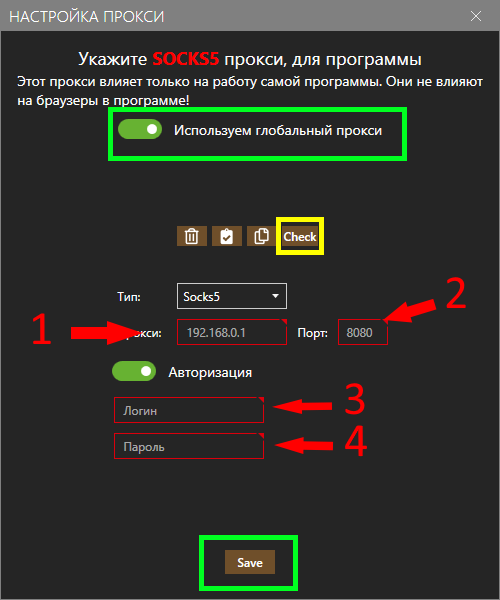
2. После оплаты, сервис прокси предоставляет вам данные.(К примеру, как на рис1)&#x20;
   1. Адрес сервера
   2. Порт (обязательно используйте тип SOCKS5)&#x20;
   3. Логин
   4. Пароль
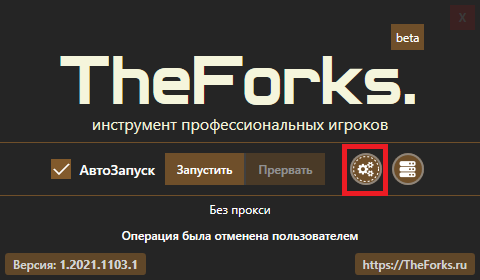
3. Откройте настройки прокси. Для этого щёлкните на значок с шестерёнками при входе в программу. (рис1) Включите прокси и введите данные, которые вам предоставил сервис прокси:
4. Проверьте подключение. Нажмите кнопку <mark style="color:yellow;">**"Check"**</mark> , чтобы убедиться, что прокси работает корректно.
5. Проверьте, что у вас включён пункт <mark style="color:$success;">**«Использовать глобальный прокси»**</mark>**.**
6. Нажмите кнопку <mark style="color:$success;">**"Save"**</mark>, что бы сохранить настройки

<figure><img src="/files/wPKpovUK9XgnSQaDMmPA" alt=""><figcaption></figcaption></figure>

<figure><img src="/files/U0qt2oEHAyiO58FhAaCK" alt=""><figcaption></figcaption></figure>

<figure><img src="/files/lgOgh5RJOlYHDaLXS90T" alt=""><figcaption></figcaption></figure>

### Vpn


---

# Agent Instructions
This documentation is published with GitBook. GitBook is the documentation platform designed so that both humans and AI agents can read, navigate, and reason over technical content effectively. Learn more at gitbook.com.

## Querying This Documentation
If you need additional information that is not directly available in this page, you can query the documentation dynamically by asking a question.

Perform an HTTP GET request on the current page URL with the `ask` query parameter, and the optional `goal` query parameter:

```
GET https://wiki.theforks.ru/problemy-so-vkhodom/nastroit-proksi-dlya-vkhoda-v-programmu.md?ask=<question>&goal=<endgoal>
```

`ask` is the immediate question: it should be specific, self-contained, and written in natural language.
`goal` is optional and describes the broader end goal you are ultimately trying to accomplish on behalf of the user. GitBook uses it to tailor the answer towards what is most useful for that goal.

The response will contain a direct answer to the question and relevant excerpts and sources from the documentation.

Use this mechanism when the answer is not explicitly present in the current page, you need clarification or additional context, or you want to retrieve related documentation sections.