> For the complete documentation index, see [llms.txt](https://wiki.theforks.ru/llms.txt). Markdown versions of documentation pages are available by appending `.md` to page URLs; this page is available as [Markdown](https://wiki.theforks.ru/problemy-so-vkhodom.md).
# Проблемы со входом
**Из-за блокировок у некоторых пользователей могут возникать проблемы с доступом к программе.**\
Чтобы решить эту проблему, мы предоставляем несколько серверов на выбор, к которым вы можете подключиться.
Пошаговая инструкция:
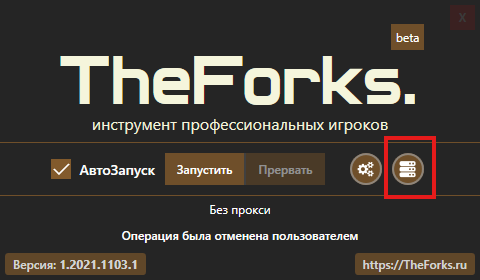
1. Запустите программу и нажмите кнопку **настройки сервера**, как показано на *рис. 1*.
2. Нажмите кнопку **«Проверить доступность»**, как показано на *рис. 2*.
3. Выберите доступные серверы и **сохраните настройки**.
{% hint style="danger" %}
Если это не помогло, к сожалению, вам потребуется использовать прокси или VPN.\
О том, как их настроить, вы можете прочитать[ в этой инструкции.](/instrukciya-1/nastroika-proxy.md)
{% endhint %}